Support
Getting started
1Install Apple TestFlightApple's app for trying beta apps
- Open the App Store on your iPhone or iPad.
- Search for "TestFlight" and install it.
2Join the Healing365 betaUse our invitation link on the same device
- Open the invitation link on your iPhone or iPad.
- Tap Accept, then Install.
- Open Healing365 and complete the short setup.
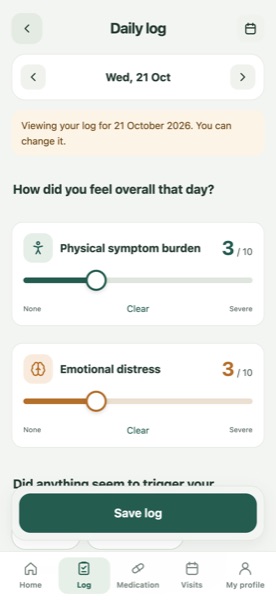
3Record your first dayTwo scores, then anything else you noticed
- Tap Log.
- Rate your physical and emotional scores. Leave one blank if unsure.
- Add symptoms, foods or medicines if you like, then tap Save log.
4Explore trends and summariesBefore your next appointment
- On Home, switch between 7, 14 and 30 days.
- Add questions under Visits → Notes.
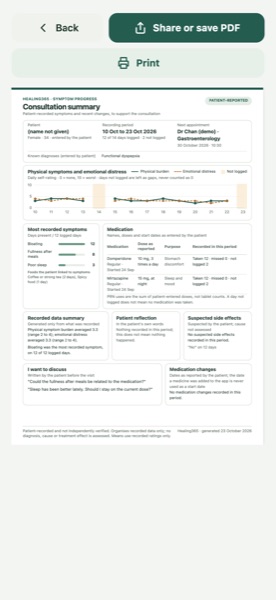
- Go to Visits → Prepare consultation summary, choose a language, then share or print.
Frequently asked questions
Is Healing365 free?
Yes. Healing365 is free for patients. It is currently a beta available through Apple TestFlight.
Who can use Healing365?
The public beta is for adults aged 18 and over, on an iPhone or iPad with iOS or iPadOS 15 or later.
Can Healing365 diagnose or give treatment advice?
No. Healing365 is intended for personal health recording and consultation preparation. It does not provide diagnosis, treatment advice, or emergency monitoring.
Does Healing365 use AI to analyse my records?
No. Summaries use simple calculations such as averages and day counts.
Where is my data stored?
Only on your device. We have no server and cannot see, restore or delete your records, so please export backups regularly.
How do I delete my data?
Me → Settings → Delete all data. Delete any exported files and device backups yourself.
Can I use Healing365 on Android?
Not at the moment. Healing365 currently supports iPhone and iPad with iOS 15 or later.
How do I change the language?
Go to Me → Settings → Language. You choose the summary language separately each time you make a summary.
Can I fill in a day I missed?
Yes. Tap the day on the Home calendar (orange means not logged), or use the date arrows in the daily log, and answer for how that day was.
No answers match your search. Try another word, or contact us.
Troubleshooting
The app closes unexpectedly
Update to the latest beta in TestFlight, then restart your iPhone. If it keeps happening, send feedback from TestFlight straight after the crash: TestFlight can include the crash report. Tell us what you were doing at the time.
Updating through TestFlight
Open TestFlight and tap Update next to Healing365. Each beta build can be used for a limited time (usually 90 days), so update when TestFlight asks. Export a backup before updating.
My records are missing
Make sure you are opening the same TestFlight app you used before; earlier test builds were separate apps. If iOS cleared storage when your phone was low on space, Healing365 restores from its copy on the device the next time you open it. If you deleted the app, records can only come back from a backup you exported.
The PDF will not export or share
Close the summary and open it again, then tap Share or save PDF. Check that your phone has free storage. If it still fails, email us your device model and iOS version.
Backing up and restoring
Me → Settings → Export a backup saves one file wherever you choose. To restore, choose Import a backup and pick that file. Importing replaces the data currently in the app.
Moving to a new phone
Export a backup on the old phone and send it to the new one, for example with AirDrop or Files. Install Healing365 on the new phone through TestFlight, then use Import a backup.
Reporting a bug
In TestFlight, open Healing365 and tap Send Beta Feedback, or take a screenshot in the app and share it as beta feedback. Please cover any personal details first. You can also email us.
Email us
Please do not send medical records, medication lists or screenshots that show your health information by ordinary email.
To help us help you, include:
- The app version (Me, at the bottom of the page)
- Your iPhone or iPad model and iOS version
- What happened, and what you expected
- The steps that lead to the problem
Urgent help
Healing365 is not an emergency service, and nobody monitors what you enter in the app. If you are in immediate danger, call 999 or go to the nearest Accident and Emergency department. For your health or medicines, contact a healthcare professional.
Hong Kong services. Numbers checked against official sources on 22 October 2026.